Connect a Microsoft 365 Mailbox to ServiceDesk Plus Cloud
was last updated on
This is a short post detailing how to connect a Microsoft 365 mailbox to ServiceDesk Plus Cloud, which is essential if you want emails to create and update tickets.

Set3 Solutions are the go-to people for ManageEngine services in the UK. With over two decades of expertise, we assist hundreds of UK customers each year in making sense of ManageEngine. Click here to contact your local UK partner today.
ServiceDesk Plus Cloud supports OAuth 2.0 for Microsoft 365 and Outlook mailboxes. This means:
- No legacy basic authentication
- No storing mailbox passwords
- Secure token-based access
You do not need to create your own Azure app registration. ManageEngine uses its own application client.
Connect a Microsoft 365 Mailbox to ServiceDesk Plus Cloud: M365 Prerequisites
Before configuring the mailbox, check the following in the Microsoft 365 Admin Center:
- Modern Authentication is enabled
This is usually enabled by default. - POP/IMAP and SMTP are enabled
These must be enabled at mailbox level. - You have permission to grant consent
You must be able to approve the OAuth sign-in request (typically Global Admin or Application Admin).
If admin consent is restricted in your tenant, approval will be required before the connection can complete.
Connecting the Microsoft 365 Mailbox in ServiceDesk Plus Cloud
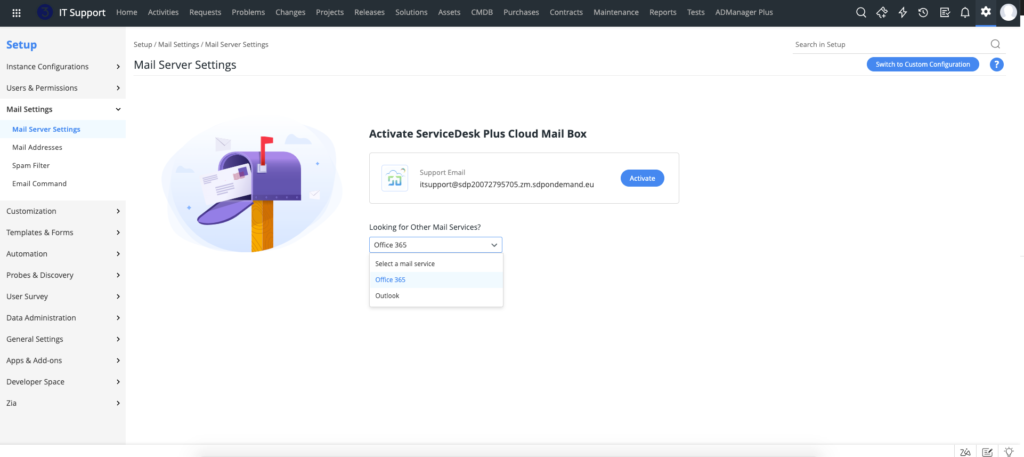
- Go to Setup → Mail Settings → Mail Server Settings
- Select Office 365 / Outlook
- Click Proceed
- Sign in with your support mailbox (e.g. support@set3.co.uk)
- Approve the consent request
Once authenticated, the mailbox will be connected.
Post-Connection Settings
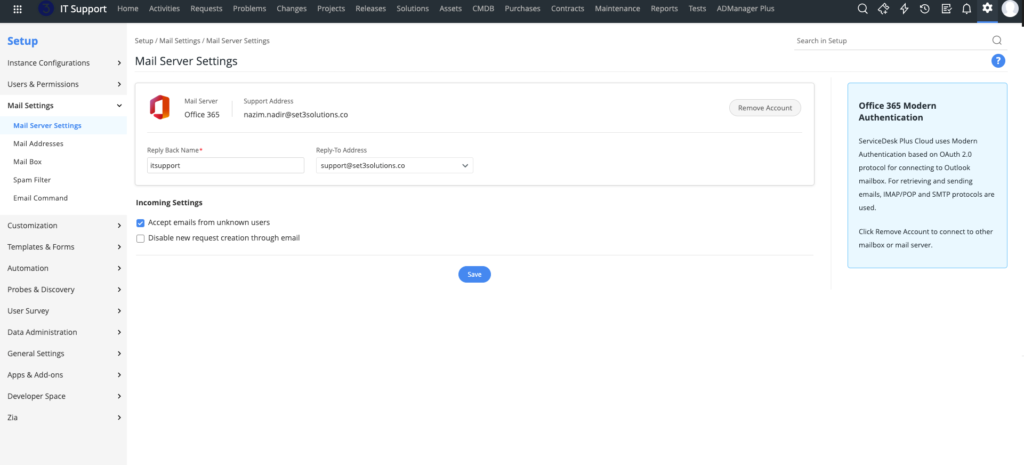
After signing in, complete the following:
Reply Back Name
The display name shown on outgoing emails (e.g. “IT Support”).
Reply-To Address
Select the verified address outgoing emails should be sent from.
Incoming Mail Settings
You can configure:
- Accept emails from unknown sources
Allow or block external domains from creating requests. - Disable new request creation through email
Stops new tickets being created via email (email can still update existing tickets). - Restrict specific email addresses or domains
Prevent certain senders from generating requests.
Click Save once complete.
You can also add other email addresses to use as Reply-To addresses in the mail server configuration and for specific Technician Groups:
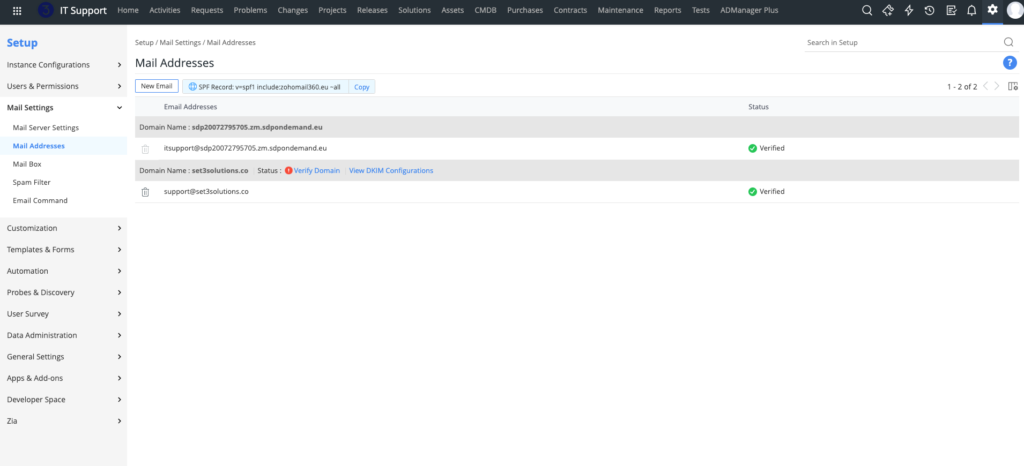
That’s all that’s required. Once connected, emails sent to the configured mailbox will create and update tickets in ServiceDesk Plus Cloud.
Need Help?
If you’d like expert assistance configuring ServiceDesk Plus mail, Set3 Solutions can help.
As ManageEngine’s leading UK partner, we support hundreds of customers each year with licensing, configuration, and implementation of the full ManageEngine suite.
Contact Set3 Solutions today for professional guidance.
This article is relevant to:
Service Desk
Take the Next Step
Tap into the extensive knowledge of Set3 Solutions, your local UK ManageEngine Technology Partner, and accelerate your ManageEngine experience today.
Contact usOther recent articles in the same category
You may be interested in these other recent articles
Stay Ahead with the Latest Updates for ManageEngine Analytics Plus
29 September 2026
Discover the latest ManageEngine Analytics Plus updates, including new features, fixes, and enhancements.
Read moreLatest Updates for ManageEngine Endpoint Central
28 September 2026
Discover the latest Endpoint Central updates, including new features, fixes, and enhancements.
Read moreStay Ahead with the Latest Updates for ManageEngine OpManager
23 September 2026
Discover the latest OpManager updates, including new features, fixes, and enhancements.
Read moreLatest Updates for ManageEngine ServiceDesk Plus On-Premise
Discover the latest ServiceDesk Plus updates, including new features, fixes, and enhancements.
Read moreLatest Updates for ManageEngine ServiceDesk Plus Cloud
Discover the latest ServiceDesk Plus Cloud updates, including new features, fixes, and enhancements.
Read more