Migrating from ServiceDesk Plus on-premise to the cloud edition is not a straightforward lift-and-shift. The two versions share similar functionality but differ significantly under the hood, and getting the migration wrong can mean lost data, broken workflows, or a messy go-live.
This guide covers everything you need to know before you start: what data transfers automatically, what doesn’t, key limitations to plan around, and an overview of the process. It’s based on our experience helping UK organisations through this migration and we’ve kept it practical rather than theoretical.
If you’d rather have someone handle it for you, or you’re migrating from a different ITSM tool entirely such as ServiceNow or Spiceworks, we can help with that too. Get in touch with our team today.
Pros and Cons of Migrating to ServiceDesk Plus Cloud

On-Premise Advantages
- Full control over deployment, customisation, and database access.
- Seamless integration with local services, including Active Directory.
- Efficient asset and network scanning for local and distributed environments.
Cloud Advantages
- No hardware or maintenance requirements.
- Accessible from anywhere with an internet connection.
- Regular updates and security patches managed by ManageEngine.
Cloud Limitations
- No direct database access; customisation is restricted to UI-based options.
- Some on-premise software is still required for asset scanning and Active Directory integration.
Public vs Private Cloud

Not all migrations need to be to the public cloud edition. Businesses can opt for a private cloud setup using platforms like Microsoft Azure or AWS. This allows organisations to maintain a virtualised instance of ServiceDesk Plus On-Premise while benefiting from cloud infrastructure.
- Private Cloud Benefits: Retains full control over customisations and integrations while offering cloud accessibility.
- Public Cloud Benefits: Fully managed by ManageEngine, reducing administrative overhead.
If you already operate within a private cloud environment, this approach may be more suitable than switching entirely to the cloud edition.
Authentication

On-Premise Authentication
- Typically uses Active Directory (AD) for authentication and Single Sign-On (SSO).
- Automatic synchronisation of new users from AD.
Cloud Authentication
- Supports Microsoft 365 and Google Workspace for user authentication, amongst others.
- Synchronisation from on-premise Active Directory is available but requires a software utility.
- Domains used for authentication must be verified in the cloud configuration.
Asset Management

Asset management capabilities remain similar, but network scanning requires additional steps in the cloud version.
- Cloud Edition: Requires a scanning probe installed on Windows devices within the network.
- On-Premise Edition: Direct integration with the local network for seamless asset discovery.
Integrations

- Cloud Edition: Focuses on integrations with SaaS solutions such as Microsoft 365 and Teams.
- On-Premise Edition: Offers deeper integration with ManageEngine’s on-premise solutions.
Get in touch and our team can walk you through the full differences based on your setup.
Migrating to ServiceDesk Plus Cloud: What Transfers and What Doesn’t?
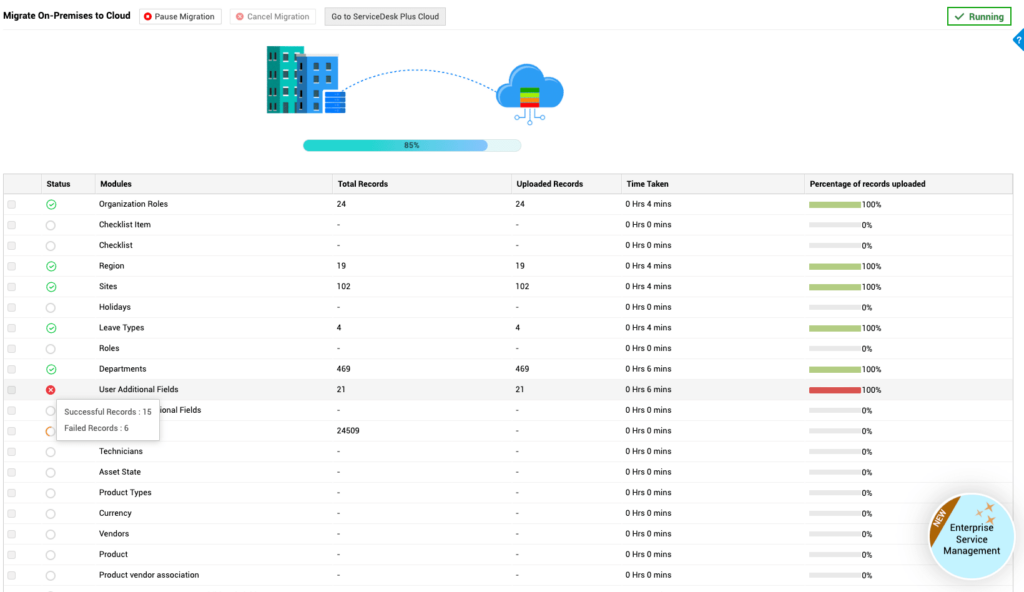
Data Included When Migrating to ServiceDesk Plus Cloud
| Module | Data that can be migrated |
|---|---|
| Home | Backup Approver, Tasks |
| Requests | All entities: Requests, Notes, Drafts, Worklog Timers, Tasks, Task dependencies, Worklog, Task Comments, Conversations, Notifications, Attachments, Resolution, Reminders, approval. Archived Requests and their sub-entities: Tasks, Task Comments, Task Worklogs, Request Worklogs, Conversations, Notifications, Notes, Request Attachments, Resolution Attachments, Task Attachments, Conversations Attachments, Notification Attachments. |
| Changes | All entities: Change requests, Change role, Change Status Comments, Downtime, Descriptive fields, Notifications, Attachments, Task, Task dependencies, Task Comments, Worklog, Notes, Change approval level, Change approval. |
| Solutions | Topic, Solutions, Solution Status, Attachments |
| Assets | All assets, Asset Cost, Attachments |
| Purchase | All entities: Purchase Order, PO invoice, PO payment, PO approval level, PO approvals, PO attachment |
| Contract | All entities: Contract, Child-Parent relationship, Renewed Contract, Contract Attachment, Contract-Asset relationships, Contract Notification Configuration |
| Problem | All entities: Problem, RootCause, Symptoms, Impact Details, Notes, Worklog, Tasks, Task dependencies, Worklog, Task Comments, Attachments. |
| Project | All entities: Project, milestones, Tasks, worklogs, Project Request Association, Project Change Association |
Data Not Included When Migrating to ServiceDesk Plus Cloud
- Request tags, Request Dependency, and Notes Attachments in Requests Module.
- Form colour and font in Incident and Service Templates
- Help text for sections and fields in Incident and Service Templates
- Incident and Service Template icons
- Short description or any instruction, notes, or guidelines for Technician/Requester in Incident and Service Templates
- Template Actions in Service Templates
- Category change manager field in Category
- $AllTechnicians role in Change Templates.
- Solution Owner field and Workaround type in Solutions module.
- $EmailSignature and $ITService will not be resolved in Reply Templates.
- Inline images in Worklog.
Limitations
While migrating to ServiceDesk Plus Cloud offers significant benefits, there are some important limitations to keep in mind:
- General: Attachments exceeding 48 MB will not migrate. History, associations, and certain field values may not transfer. Special characters in text fields could be altered or removed.
- Requests: Dependencies, notes, and archived request details will not be migrated. Approval workflows and scheduled times may not transfer correctly.
- Changes: Change ID sequences and some approval data will not migrate. Limited task migration (up to 300 tasks per change).
- Projects: Certain field value limits may cause data to be trimmed during migration.
- Solutions: Solution owner and workaround types will not migrate. Empty description fields will be filled with a dummy entry.
- Assets: Issues with duplicate service tags or missing associations may cause migration issues.
- Reports: Query reports will not migrate, and Zoho Analytics integration will no longer sync.
- Field & Form Rules: Some field actions will not function after migration, and duplicate field names could cause issues.
Additionally, some data must be imported manually. For a full list of limitations, please contact us.
Migrating to ServiceDesk Plus Cloud: Process Overview
- Preparation:
- Ensure mail server settings are configured but disabled before migration. Do not change the email address configured in the mail server settings during the migration process.
- Verify all technicians have unique email addresses.
- Ensure there are no existing requests or projects in the Cloud instance, including any trashed requests or projects.
- Identify duplicate field names in additional request fields to prevent migration failures.
- Fields and Field and Form Rules are case-sensitive in on-premise but not in Cloud. Check and update accordingly before starting.
- Verify licence count, technician count, and additional fields count manually in Cloud before starting the migration.
- Enable PII settings in Cloud if they were used in on-premise.
- Configure default currency before migration.
- Check that the attachment path and network path are configured correctly in attachment settings.
- Create dummy workflows in Cloud before migration to maintain Change Request links.
- Create IAM accounts and enable login for CAB members to ensure successful migration of CAB data.
- Disable archive settings and enable privacy settings in SDP Cloud before starting.
- Do not migrate the Maintenance module in the early stages. This must be done in the final phase only.
- Avoid any database operations during migration as this can cause failures.
- Initiate the migration on a test server first. Only use the production server for the final delta migration.
- Do not add any user data before migration, whether manually or via CSV import, Azure, or Active Directory. Enable integrations only after users have been successfully migrated.
- Initiation:
- Contact ManageEngine support to enable the migration feature.
- Use OAuth 2.0 authentication to establish communication between on-premise and Cloud.
- Select entities to migrate and choose between Trial Mode (last 30 days) or Full Mode (up to 1 year of data by default, extendable to 5 years via a database query). Note that mode selection applies to module desk data only and does not affect admin data, assets, or solutions.
- Validation & Troubleshooting:
- Address any pre-validation errors (e.g., duplicate field names, missing configurations).
- Monitor migration progress and review import history for errors.
- Manually migrate any data that cannot be transferred automatically.

Migrating to ServiceDesk Plus Cloud? We Can Help.
Set3 Solutions has guided many UK organisations through ServiceDesk Plus migrations, both from the on-premise edition and from third-party ITSM tools including ServiceNow and Spiceworks.
Migration projects vary in complexity. Some customers need a full end-to-end service; others just want a second pair of eyes on their preparation checklist or help troubleshooting a specific issue along the way. Either way, we’re happy to have a conversation.
Contact our team today for straightforward, practical advice.
This article is relevant to:
CloudService Desk
Take the Next Step
Tap into the extensive knowledge of Set3 Solutions, your local UK ManageEngine Technology Partner, and accelerate your ManageEngine experience today.
Contact usOther recent articles in the same category
You may be interested in these other recent articles
Latest Updates for ManageEngine Endpoint Central
9 June 2026
Discover the latest Endpoint Central updates, including new features, fixes, and enhancements.
Read moreLatest Updates for ManageEngine ServiceDesk Plus Cloud
5 June 2026
Discover the latest ServiceDesk Plus Cloud updates, including new features, fixes, and enhancements.
Read moreLatest Updates for ManageEngine ServiceDesk Plus On-Premise
4 June 2026
Discover the latest ServiceDesk Plus updates, including new features, fixes, and enhancements.
Read moreStay Ahead with the Latest Updates for ADSelfService Plus
3 June 2026
Discover the latest ADSelfService Plus updates, including new features, fixes, and enhancements.
Read moreStay Ahead with the Latest Updates for ManageEngine Analytics Plus
2 June 2026
Discover the latest ManageEngine Analytics Plus updates, including new features, fixes, and enhancements.
Read more