RMM Central
Remote Monitoring and Management (RMM) Software for MSPs
Overview
ManageEngine RMM Central is an all-in-one remote monitoring and management (RMM) solution designed for Managed Service Providers (MSPs) and IT teams to efficiently manage, monitor, and maintain client networks from a centralized platform. It offers comprehensive capabilities including network and endpoint monitoring, automated patch management, remote access, IT asset management, and service desk integration. RMM Central supports multi-client architecture, enabling MSPs to handle multiple customers with ease, while ensuring security, performance, and compliance across all managed environments. With its automation and scalability, RMM Central helps streamline IT operations, reduce downtime, and enhance service delivery.
Key Features
• Network discovery
• Network device monitoring
• Server management
• Patch management
• Remote control
• IT asset management
• Alerts and reporting
Which IT Challenges Does RMM Central Solve?
ManageEngine RMM Central addresses key challenges in remote monitoring and management:
• Network downtime: Monitors endpoints and servers in real-time to prevent outages.
• Manual patch management: Automates third-party and OS patching for MSP-managed devices.
• Lack of client visibility: Provides client-specific dashboards to track performance and security.
• Slow incident response: Sends instant alerts for critical issues, enabling rapid remediation.
• Compliance gaps: Ensures client devices meet regulatory standards with automated scans.
Which Edition Of RMM Central Do I Need?
ManageEngine RMM Central is available in the following editions:
• Free Edition: Manages up to 20 endpoints and 5 devices, with features like patch management, software deployment, and a self-service portal.
• Enterprise Edition: Scalable for larger environments, offering advanced patch management, software deployment, and enhanced features for managing endpoints and devices.
The Free Edition is suitable for smaller environments, while the Enterprise Edition is designed for more complex, larger setups.
Available Platforms
MSP
Customers Who Bought RMM Central Also Bought
• ServiceDesk Plus MSP – Enterprise-grade PSA and ITSM platform for MSPs
• PAM360 – Privileged access management for service providers
• Password Manager Pro – Password management for service providers
• Endpoint Central MSP – Unified endpoint management and security
• Mobile Device Manager Plus MSP – Comprehensive mobile device management
• OpManager MSP – Multi-tenant network monitoring, simplified for managed service providers
• Site24x7 – Remote monitoring for MSPs and CSPs
Need more information?
Review application capabilities instantaneously via online demo links, test out features with free trial licenses or simply browse a range of related product resources.
Need more information?
Review application capabilities instantaneously via online demo links, test out features with free trial licenses or simply browse a range of related product resources.
ADManager Plus MSP
Unified Active Directory management and reporting solution for MSPs
Comprehensive Active Directory management and reporting for managed service providers
Not an MSP? Check out ADManager Plus!
- Centralised Management
- Customisable dashboards
- Granular role-based access control
- Built-in reports library
- Mobile-based management
- Automated actions across clients’ hybrid IT infrastructures
- Enterprise-ready integrations
- Auditing and compliance
- Custom workflows with alerts
Need more information?
Review application capabilities instantaneously via online demo links, test out features with free trial licenses or simply browse a range of related product resources.
Download a trial
Access DownloadMore information
Read moreNeed more information?
Review application capabilities instantaneously via online demo links, test out features with free trial licenses or simply browse a range of related product resources.
EventLog Analyzer MSP
Log management and advanced threat intelligence for MSSPs
Monitor and manage logs from clients around the world
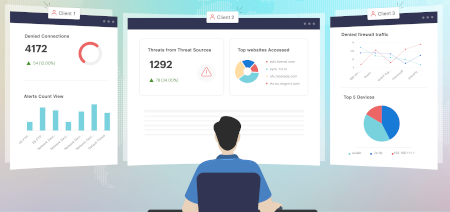
Manage your network with OpManager Plus!
As an MSSP, managing the log data of your clients can be challenging at times. Collecting, storing, analyzing, and deriving security insights, and managing compliance using the logs from multiple clients isn’t an easy task.
EventLog Analyzer’s Distributed Edition is the perfect solution for MSSPs who want to have a 360-degree view into what’s happening in each of their clients’ managed servers. Install the product in each of your client’s distributed servers, and build instant reports from the admin console.
Need more information?
Review application capabilities instantaneously via online demo links, test out features with free trial licenses or simply browse a range of related product resources.
Download a trial
Access DownloadMore information
Read moreNeed more information?
Review application capabilities instantaneously via online demo links, test out features with free trial licenses or simply browse a range of related product resources.
Password Manager Pro MSP
Privileged Password Management for MSP
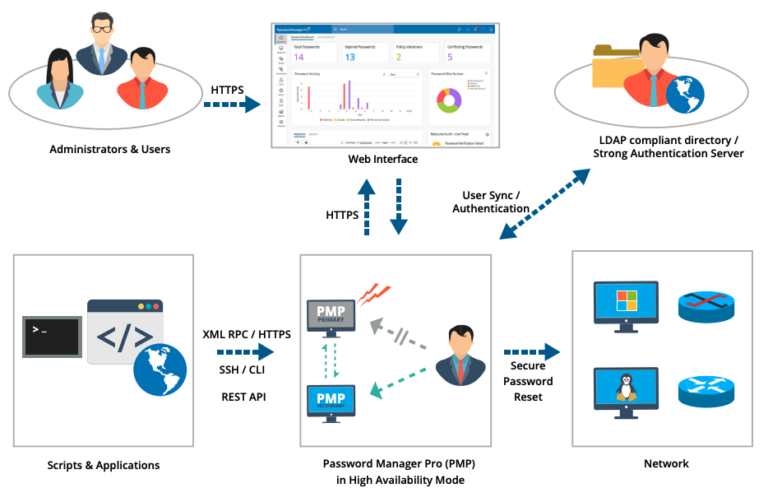
Password Manager Pro MSP Edition – Manage the password of multiple customers in a single instance with robust data segregation
Check out PAM360 for the full suite!
Managed Service Providers (MSPs), in particular those managing the IT and network infrastructure of their customers, are swamped by the ever-increasing number of privileged passwords. Without appropriate management tools, this can lead to a haphazard style of password management where the administrative passwords – which grant unlimited access privileges on the IT assets – are stored in plain text in volatile sources like post-its, spreadsheets, printouts and text documents; insecurely shared among technicians without relevant protection, leaving the client organizations open to security attacks.
Password Manager Pro MSP offers:
- Multi-tenant architecture
- Centralised Management
- Controlled Access
- High Availability
- Complete Audit History
Need more information?
Review application capabilities instantaneously via online demo links, test out features with free trial licenses or simply browse a range of related product resources.
Need more information?
Review application capabilities instantaneously via online demo links, test out features with free trial licenses or simply browse a range of related product resources.
PAM360 MSP
Complete privileged access security for service providers
Powerful 360-degree protection for the digital age
PAM360 Recognised in the Gartner® Magic Quadrant™ Read More Here!
Important Security Advisory for PAM360, Click Here to Read More!
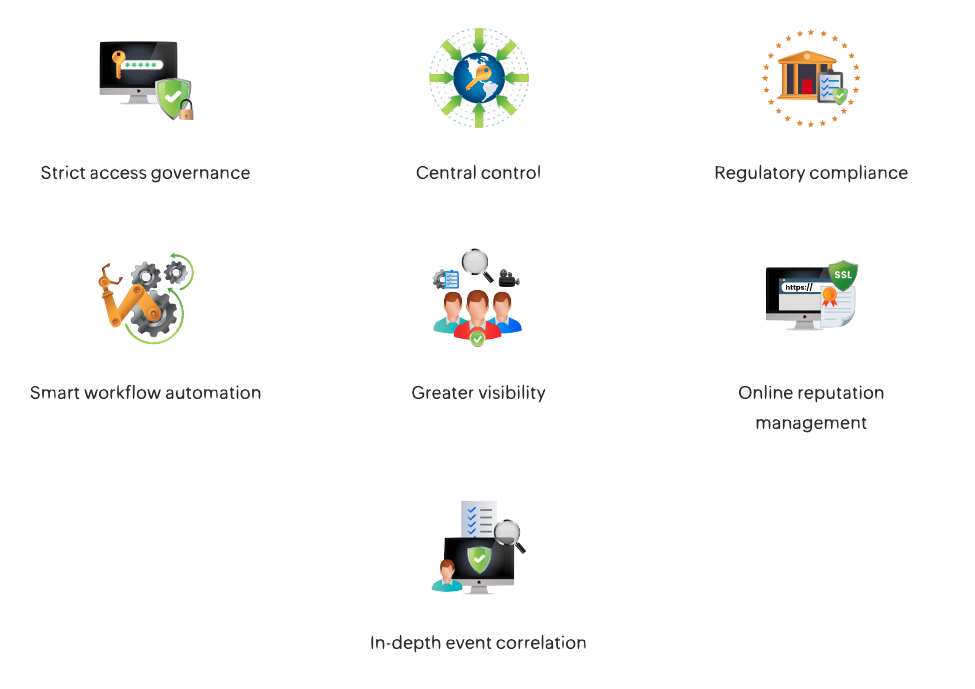
- Enterprise credential vault
- Secure remote access
- Privilege elevation and delegation management
- Privileged session monitoring
- Privileged user behaviour analytics
- Context-aware event correlation
- Audit and compliance
- Comprehensive reporting
- DevOps Protection
- Ticketing system integration
- SSH key management
- Application credential security
- SSL certificate management
Need more information?
Review application capabilities instantaneously via online demo links, test out features with free trial licenses or simply browse a range of related product resources.
Need more information?
Review application capabilities instantaneously via online demo links, test out features with free trial licenses or simply browse a range of related product resources.
ServiceDesk Plus MSP
All-in-one ITSM suite, Designed Specifically for Service Providers
Overview
ServiceDesk Plus MSP is ManageEngine’s IT service management (ITSM) solution designed specifically for managed service providers, enabling them to deliver efficient, multi-tenant support across multiple client organisations from a single, unified platform. It offers comprehensive features, including incident, problem, change, and asset management, along with powerful automation, SLA enforcement, and billing capabilities tailored to MSP needs. With secure segregation of client data, customisable service catalogues, and integration with remote monitoring and management tools, it helps MSPs streamline operations, improve service delivery, and demonstrate value to their customers. Available both on-premise and in the cloud, it provides flexibility and scalability for service providers of all sizes.
Key Features
• Multi-tenant architecture – manage multiple client organisations from one console.
• ITIL-aligned service management – incident, problem, change, release, and asset management.
• Customisable service catalogues – tailored services per client.
• SLA management – enforce client-specific service levels.
• Automated workflows – streamline ticket handling and approvals.
• Billing & time tracking – capture technician time and generate client invoices.
• Remote support integration – connect with RMM and remote tools.
• Reports & dashboards – monitor performance and demonstrate value to clients.
Which IT Challenges Does ServiceDesk Plus MSP Solve?
Here are some of the key issues ServiceDesk Plus MSP helps solve:
• Fragmented support across multiple clients.
• Lack of centralised ticketing and request tracking.
• Difficulty enforcing client-specific SLAs.
• Manual, time-consuming workflows and escalations.
• Poor visibility into technician performance and service delivery.
• Challenges in tracking billable hours and generating invoices.
• Limited reporting to demonstrate value to clients.
Which Edition Of ServiceDesk Plus MSP Do I Need?
ServiceDesk Plus MSP comes in three main editions, each increasing in feature set:
• Standard Edition – if you mostly need core help-desk features: ticketing, SLAs, knowledge base, self-service portal, reporting. It’s good if you’re just getting started, have fewer users/assets, or don’t yet need full asset/project/change workflows.
• Professional Edition – if you also want asset management (tracking hardware/software, contracts, depreciation), or want to manage purchasing, contracts, etc. This works well if you’re already growing and need to link tickets to assets.
• Enterprise Edition – if you need the full ITSM stack: change management, problem management, project management, CMDB, service catalogues, more sophisticated workflows. If you’re delivering services to multiple clients and need mature processes, this is the edition that gives you all the tools.
If you need cloud-based flexibility, go for ServiceDesk Plus Cloud; if you prefer full control and customisation, choose on-premise deployment.
Available Platforms
On-Premise,Cloud,MSP
Customers Who Bought ServiceDesk Plus MSP Also Bought
• MSP Central – Integrated platform for PSA, RMM and cybersecurity for MSPs
• RMM Central – Unified network monitoring and endpoint management for MSPs
• ADManager Plus MSP – Identity management and access governance for AD and Microsoft 365
• PAM360 – Privileged access management for service providers
• Password Manager Pro – Password management for service providers
• Endpoint Central MSP – Unified endpoint management and security
• Log360 MSSP – Unified SIEM solutions for MSSPs
• Mobile Device Management Plus MSP – Comprehensive mobile device management
• OpManager MSP – Multi-tenant network monitoring, simplified for managed service providers
• Site24x7 – Remote monitoring for MSPs and CSPs
Need more information?
Review application capabilities instantaneously via online demo links, test out features with free trial licenses or simply browse a range of related product resources.
Need more information?
Review application capabilities instantaneously via online demo links, test out features with free trial licenses or simply browse a range of related product resources.
Endpoint Central MSP
(formerly Desktop Central MSP) Unified endpoint management and security
Overview
Endpoint Central MSP is a comprehensive, cloud-ready unified endpoint management (UEM) solution designed for Managed Service Providers to centrally manage and secure client endpoints across multiple customer environments. It enables MSPs to deliver patch management, software deployment, asset tracking, remote troubleshooting, mobile device management, and endpoint security from a single console, helping reduce operational overhead while improving service delivery. With multi-tenant architecture, strong automation, and scalability, Endpoint Central MSP empowers service providers to standardise IT operations, ensure compliance, and enhance client satisfaction.
Key Features
• Multi-tenant architecture to manage multiple customer environments from one console
• Automated patch management for OS and third-party applications
• Software deployment and distribution across client endpoints
• Comprehensive asset management for hardware and software inventories
• Remote control and troubleshooting tools for quick support
• Mobile Device Management (MDM) for iOS, Android, and Windows devices
• Security management, including endpoint protection and configuration compliance
• Scalable and cloud-ready to support growing MSP operations
Which IT Challenges Does Endpoint Central MSP Solve?
Here are some of the key issues ServiceDesk Plus Endpoint Central MSP helps solve:
• Time-consuming manual patching and updates
• Inconsistent software deployment across client sites
• Lack of visibility into hardware and software assets
• Security risks from unpatched or misconfigured endpoints
• Limited ability to support remote users quickly
• Complexity of managing multiple customers from separate tools
Which Edition Of Endpoint Central MSP Do I Need?
Endpoint Central MSP comes in three main editions, each increasing in feature set:
• Free Edition — up to about 25 endpoints (computers + mobile) with basic features.
• Professional Edition — more endpoints, more management features, mobile device management, better scalability.
• Enterprise Edition — fullest features, highest endpoint limits, add-ons, integrations. Best for MSPs with a larger customer base.
If you need cloud-based flexibility, go for ServiceDesk Plus Cloud; if you prefer full control and customisation, choose on-premise deployment.
Available Platforms
On-Premise,Cloud,MSP
Customers Who Bought Endpoint Central MSP Also Bought
• MSP Central – Integrated platform for PSA, RMM and cybersecurity for MSPs
• RMM Central – Unified network monitoring and endpoint management for MSPs
• ADManager Plus MSP – Identity management and access governance for AD and Microsoft 365
• PAM360 – Privileged access management for service providers
• Password Manager Pro – Password management for service providers
• Servicedesk Plus MSP – Enterprise-grade PSA and ITSM for MSPs
• Log360 MSSP – Unified SIEM solutions for MSSPs
• Mobile Device Management Plus MSP – Comprehensive mobile device management
• OpManager MSP – Multi-tenant network monitoring, simplified for managed service providers
• Site24x7 – Remote monitoring for MSPs and CSPs
Need more information?
Review application capabilities instantaneously via online demo links, test out features with free trial licenses or simply browse a range of related product resources.
Need more information?
Review application capabilities instantaneously via online demo links, test out features with free trial licenses or simply browse a range of related product resources.
OpManager MSP
Network and Server Monitoring for Managed Service Providers
Looking for a cloud-based solution? Check out Site24x7
Multi-client Network Management
- Cisco UCS Monitoring
- IBM Monitoring
- Network Performance Monitoring
- Packet Loss Monitoring
- SNMP Trap Monitoring
- Syslog Monitoring
- VoIP Monitoring
- VPN Monitor
- WAN Monitoring
- WLC Monitoring
- WMI Monitoring
- Windows Process Monitoring
Multi-client Fault Management
- Fault Management
- IT Workflow Automation
- Network Automation
- Service Level Management Dashboards
Physical Server Management
- Exchange Monitoring
- FTP Monitoring
- File/Folder Monitoring
- Process Monitoring
- Server Performance Monitor
- Service Monitoring
Virtual Server Management
- Hyper-V Monitoring
- Hyper-converged Infrastructure Monitoring
- Nutanix Monitoring
- VMWare Monitoring
- Virtual Machine Monitoring
Multi-Client Storage Management
- Storage Monitoring
Multi-Client Visibility
- Network Monitoring Dashboards
- Network Visualisation
Multi-Client Hardware Management
- CPU Monitor
- CPU Temperature Monitor
- Hardware Monitor
- Printer Monitoring
- Router Monitoring
- Switch Monitoring
Need more information?
Review application capabilities instantaneously via online demo links, test out features with free trial licenses or simply browse a range of related product resources.
Need more information?
Review application capabilities instantaneously via online demo links, test out features with free trial licenses or simply browse a range of related product resources.
Site24x7
Cloud-based Remote Monitoring Tool for MSPs
Overview
ManageEngine Site24x7 is a cloud-based, AI-powered observability platform designed to provide comprehensive monitoring for websites, servers, applications, networks, and cloud infrastructure. It offers features such as real user monitoring (RUM), synthetic transaction testing, application performance monitoring (APM) for various technologies, and infrastructure monitoring across diverse environments. With support for over 130 global monitoring locations, Site24x7 enables organizations to gain real-time insights into end-user experiences and system performance. Additional capabilities include log management, digital risk analysis, and customizable dashboards, all accessible through a unified console. Site24x7 also integrates seamlessly with third-party tools like Slack, Microsoft Teams, and Jira, facilitating efficient incident management and collaboration. Its scalable architecture makes it suitable for businesses of all sizes, aiming to ensure optimal performance and availability of critical IT services.
Key Features
• Website performance monitoring
• Server monitoring
• Synthetic web transaction monitoring
• Application performance monitoring
• Network monitoring
• Real user monitoring
• Remote monitoring and management (RMM) for MSPs and CSPs
• Public and private cloud monitoring and log management
Which IT Challenges Does Site24x7 Solve?
ManageEngine Site24x7 addresses key challenges in IT infrastructure monitoring:
• Downtime risks: Monitors websites, servers, and applications in real-time to ensure high availability.
• Performance bottlenecks: Tracks application and server metrics to resolve slowdowns.
• Lack of visibility: Provides end-to-end monitoring across cloud, on-premises, and hybrid environments.
• Slow incident response: Sends instant alerts via email or SMS for outages or performance issues.
• Complex monitoring setup: Simplifies configuration with AI-driven insights and automated discovery.
Which Edition Of Site24x7 Do I Need?
ManageEngine Site24x7 offers a range of monitoring plans tailored to various IT monitoring needs:
• Free Edition: Provides basic monitoring for up to 5 resources, suitable for small-scale requirements.
• Pro Plan: Suitable for SMBs, offers 40 basic monitors, 3 advanced monitors, and 1GB of log storage.
• Classic Plan: Suitable for SMEs, includes 100 basic monitors, 5 advanced monitors, and 3 status pages.
• Enterprise Plan: Tailored, scalable plan for Enterprises.
Each plan is customisable with add-ons to suit specific monitoring requirements.
Available Platforms
Cloud,MSP
Customers Who Bought Site24x7 Also Bought
• CloudSpend – AI-powered cloud cost observability for modern businesses
• Site24x7 StatusIQ – Status pages for real-time status and incident communication
• Applications Manager – Digital experience, application performance, and infrastructure monitoring
• OpManager Plus – Full-stack observability with AIOps and digital experience monitoring
• OpManager – Network, server, and storage performance monitoring