ServiceDesk Plus
World-Class Enterprise and ITSM Platform
Overview
ServiceDesk Plus is an IT service management (ITSM) solution available in both cloud and on-premise versions, designed to streamline IT support and enhance service delivery. It offers a comprehensive suite of features, including incident management, problem management, asset management, and change management, helping organisations improve efficiency and maintain compliance with ITIL best practices. The cloud version provides flexibility, scalability, and automatic updates, making it ideal for businesses looking for a hassle-free, managed solution. Meanwhile, the on-premise version offers greater control, customisation, and data security for organisations that require in-house deployment. Both versions empower IT teams to deliver high-quality support with automation, AI-driven assistance, and advanced reporting tools.
Key Features
• Best practice ITSM capabilities, Incident Management, Problem Management, Change Management
• Intelligent automations
• No-code and low-code customizations
• Enterprise service desk
• ITAM with CMDB
• Native IT integrations
• Business integration reports
Which IT Challenges Does ServiceDesk Plus Solve?
ServiceDesk Plus solves several key IT service management challenges, including:
• Unorganised Ticket Management – Provides a centralised system to track, prioritise, and resolve IT issues efficiently.
• Delayed Issue Resolution – Automates workflows, ticket assignments, and approvals to speed up IT support.
• Recurring IT Problems – Helps identify and eliminate root causes with problem management.
• Uncontrolled IT Changes – Implements structured change management to minimise risks and disruptions.
• Lack of Asset Visibility – Tracks and manages IT assets to prevent mismanagement and compliance issues.
• Limited Self-Service Options – Offers a self-service portal for users to log issues and find solutions independently.
• Poor IT Compliance & Auditing – Ensures ITIL compliance and provides audit-ready reports for governance.
• Inefficient Communication – Supports multi-channel communication (email, chat, phone, portal) for seamless IT support.
Which Edition Of ServiceDesk Plus Do I Need?
The right ServiceDesk Plus edition depends on your organisation’s size, ITSM requirements, and budget.
• Standard Edition – Best for small IT teams needing basic help desk and ticketing features, including incident management and a self-service portal.
• Professional Edition – Suitable for growing organisations that require IT asset management (ITAM) alongside help desk features to track and manage hardware and software assets.
• Enterprise Edition – Ideal for larger enterprises needing full ITIL support, including problem, change, release, and service request management, as well as advanced automation and reporting.
If you need cloud-based flexibility, go for ServiceDesk Plus Cloud; if you prefer full control and customisation, choose on-premise deployment.
Available Platforms
On-Premise,Cloud,MSP
Customers Who Bought ServiceDesk Plus Also Bought
• Analytics Plus – Advanced Reporting and Business Analytics
• Endpoint Central – Integrated Endpoint Management and Protection System
• ADManager Plus – Active Directory, M365 Management, Reporting and Automation
• ADSelfService Plus – Self-Service Password Management with Application and Workstation MFA
• OpManager & Site 24×7 – Full-stack Network and Application Visibility
• Password Manager Pro – Privileged Credential Management
• Log360 (SIEM) – Unified SIEM with Integrated DLP and CASB Capabilities
Need more information?
Review application capabilities instantaneously via online demo links, test out features with free trial licenses or simply browse a range of related product resources.
Online Demo
Get startedDownload a trial
Access DownloadNeed more information?
Review application capabilities instantaneously via online demo links, test out features with free trial licenses or simply browse a range of related product resources.
Endpoint Central
Unified Endpoint Management
Overview
Endpoint Central is a Unified Endpoint Management & Security (UEMS) solution. It enables organisations to monitor, manage, secure, and maintain a wide variety of endpoints (desktops, laptops, servers, mobile devices, etc.) from a central console. It supports multiple operating systems: Windows, macOS, Linux, iOS/iPadOS, Android, Chrome OS, tvOS. It is offered in both on-premises and cloud (SaaS) versions
Key Features
• Automated Patch Management
• Vulnerability & Security Management
• Software & OS Deployment
• Asset Management
• Configuration Management
• Remote Control & Troubleshooting
• Reporting & Compliance
• Digital Experience Monitoring
Which IT Challenges Does Endpoint Central Solve?
ManageEngine Endpoint Central addresses key challenges in unified endpoint management:
• Security vulnerabilities: Automates patch deployment for OS and third-party apps, reducing exploit risks.
• Device management complexity: Centralises control of Windows, macOS, and mobile devices in a single console.
• Compliance gaps: Ensures endpoints meet CIS and NIST standards through automated compliance scans.
• Remote workforce challenges: Supports secure remote desktop access and patch management for distributed teams.
• Manual processes: Streamlines software deployment and updates with automated policies.
Which Edition Of Endpoint Central Do I Need?
ManageEngine offer different editions (e.g. Free / Professional / Enterprise / UEM / Security) depending on feature set and scale.
• Free: Up to 25 endpoints; basic patching and inventory; limited security.
• Professional: Adds software deployment, remote troubleshooting, and basic device management.
• Enterprise: Adds peripheral/device control, audits, license management, and multi-site support.
• UEM: Adds mobile device management, OS imaging/deployment, encryption, and remote wipe.
• Security: Includes all UEM features plus advanced security: vulnerability remediation, DLP, and privilege management.
If you need cloud-based flexibility, go for Endpoint Central Cloud; if you prefer full control and customisation, choose on-premise deployment.
Available Platforms
On-Premise,Cloud,MSP
Customers Who Bought Endpoint Central Also Bought
• ADManager Plus MSP – Unified Active Directory management and reporting solution for MSPs
• Log360 – Unified SIEM solution
• PAM360 – Complete privileged access security for enterprises
• ServiceDesk Plus MSP – Full-stack service management for MSPs
• Mobile Device Manager Plus – Comprehensive mobile device management
• OpManager MSP – Network performance monitoring
• Site24x7 – Remote monitoring for MSPs and CSP
Need more information?
Review application capabilities instantaneously via online demo links, test out features with free trial licenses or simply browse a range of related product resources.
Online Demo
Get startedDownload a trial
Access DownloadNeed more information?
Review application capabilities instantaneously via online demo links, test out features with free trial licenses or simply browse a range of related product resources.
Mobile Device Manager Plus
Mobile Device Management
Overview
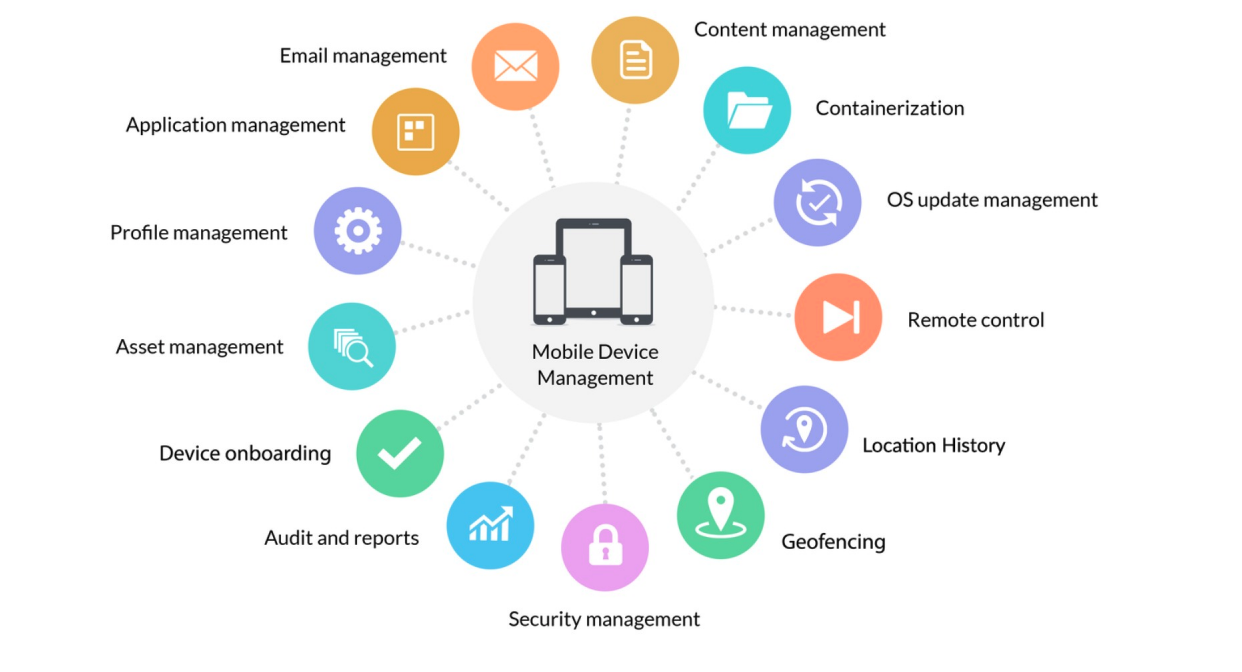
ManageEngine Mobile Device Manager Plus is a comprehensive enterprise mobility management (EMM) solution that enables organizations to securely manage and control mobile devices, desktops, and apps across multiple platforms, including iOS, Android, Windows, macOS, and Chrome OS. It offers a centralized platform for device enrollment, configuration, security policy enforcement, app and content management, and remote troubleshooting. Designed to support both corporate-owned and BYOD environments, the solution helps businesses ensure data security, maintain compliance, and improve IT efficiency, all while enhancing the user experience for mobile workforces.
Key Features
• Automated device onboarding
• Seamless app management
• Secure content management
• Comprehensive email management
• Containerization for BYOD endpoints
• Extensive OS update management
• Remote troubleshooting
• Real-time location tracking and geofencing
Which IT Challenges Does Mobile Device Manager Plus Solve?
The main issues ManageEngine Mobile Device Manager Plus solves:
• Unsecured mobile access – Ensures secure access to corporate data across devices.
• Device sprawl and lack of visibility – Centralizes control and monitoring of all endpoints.
• BYOD security challenges – Separates personal and corporate data to protect privacy and business info.
• Inconsistent policy enforcement – Applies uniform security policies across all devices.
• Manual device setup – Automates enrollment and configuration of new devices.
• Data loss from lost or stolen devices – Enables remote lock, wipe, and location tracking.
• App and content control – Manages app distribution, usage, and corporate file access.
• Compliance risks – Helps meet industry and internal regulatory requirements.
It streamlines mobile device management while improving security, productivity, and compliance.
Which Edition Of Mobile Device Manager Plus Do I Need?
Choosing the right edition of ManageEngine Mobile Device Manager Plus depends on your organisation’s device management needs and scale:
• The Free Edition is suitable for small businesses or testing purposes, supporting up to 25 devices with basic MDM features.
• The Standard Edition is ideal for organisations looking to manage devices within a single location, offering essential features like device enrollment, app management, and basic security policies.
• The Professional Edition is best for enterprises needing advanced capabilities such as remote troubleshooting, geofencing, content management, and support for multiple device types (iOS, Android, Windows, macOS).
Available Platforms
On-Premise,Cloud,MSP
Customers Who Bought Mobile Device Manager Plus Also Bought
• Endpoint Central – Integrated endpoint management and protection platform
• Endpoint Central MSP – Unified endpoint management and security
• Patch Manager Plus – Automated patching across multiple OSs and over 850+ third-party apps
• Patch Connect Plus – Simplified third-party patch deployment via ConfigMgr and Intune
• OS Deployer – Automated OS image creation and seamless role-based deployment
• Remote Access Plus – Remote troubleshooting with integrated chat, voice, and video
Need more information?
Review application capabilities instantaneously via online demo links, test out features with free trial licenses or simply browse a range of related product resources.
Need more information?
Review application capabilities instantaneously via online demo links, test out features with free trial licenses or simply browse a range of related product resources.
Mobile Device Manager Plus MSP
Cloud-Based Mobile Device Management Solution for MSPs
Help IT administrators monitor, manage, and secure mobile devices – both corporate-owned and personal devices (BYOD) for multiple customers, from a single console.
 Now a Validated Android Enterprise Partner
- Multi-platform support: iOS, Android, Windows, macOS, tvOS and Chrome OS.
- Remotely control devices without installing additional agents.
- Securely access and distribute enterprise resources.
- Efficient BYOD management through containerisation, performing remote lock and data wipe.
Need more information?
Review application capabilities instantaneously via online demo links, test out features with free trial licenses or simply browse a range of related product resources.
Need more information?
Review application capabilities instantaneously via online demo links, test out features with free trial licenses or simply browse a range of related product resources.
Log360 Cloud
Log management on a secure cloud platform
Overview
ManageEngine Log360 is a comprehensive Security Information and Event Management (SIEM) solution that integrates log management, Active Directory (AD) auditing, cloud security, and compliance monitoring into a unified platform. It enables organizations to collect, analyze, and store log data from various sources—including on-premises systems, network devices, cloud platforms, and applications—providing real-time insights into security events and user activities. Key features include advanced threat detection through correlation rules and behavioral analytics, incident response automation, compliance reporting for standards like PCI-DSS, HIPAA, and SOX, and integration with threat intelligence feeds. Log360 also offers customizable dashboards, forensic analysis tools, and a centralized console for efficient security operations and audit readiness. Its modular architecture allows for scalability and flexibility, making it suitable for organisations of all sizes seeking to enhance their security posture and streamline compliance efforts.
Key Features
• Dynamic threat intelligence and real-time threat detection
• Actionable security analytics
• End-to-end incident management
• In-depth cloud security analytics
• Anomaly detection driven by behavioural analytics
• Real-time Active Directory auditing
• Integrated compliance management
• High-speed forensic analysis engine
Which IT Challenges Does Log360 Solve?
ManageEngine Log360 addresses key challenges in security information and event management:
• Cyberattack risks: Detects threats through real-time log correlation and machine learning.
• Compliance gaps: Generates automated reports for GDPR, PCI-DSS, and HIPAA compliance.
• Log management complexity: Centralises log collection from servers, apps, and devices.
• Slow incident detection: Provides instant alerts for suspicious activities, speeding up response.
• Lack of visibility: Offers dashboards to track security events and user behaviours.
Which Edition Of Log360 Do I Need?
ManageEngine Log360 offers two editions:
1. Free Edition: Limited to 5 log sources, basic Active Directory auditing, and limited reporting features. Suitable for small-scale environments with basic requirements.
2. Premium Edition: Supports unlimited log sources, advanced Active Directory auditing, real-time reporting, cloud security management, and enhanced features like UEBA and file integrity monitoring. Suitable for larger organisations with more complex needs.
Both editions have a 30-day free trial.
Available Platforms
On-Premise,Cloud,MSP
Customers Who Bought Log360 Also Bought
• EventLog Analyzer – Comprehensive log and IT compliance management
• ADAudit Plus – Hybrid AD, cloud, and file auditing; security; and compliance
• Firewall Analyzer – Firewall rule, configuration, and log management
• Cloud Security Plus – Cloud security monitoring and analytics
• DataSecurity Plus – File auditing, data leak prevention, and data risk assessment
Need more information?
Review application capabilities instantaneously via online demo links, test out features with free trial licenses or simply browse a range of related product resources.
Online Demo
Get startedDownload a trial
Access DownloadNeed more information?
Review application capabilities instantaneously via online demo links, test out features with free trial licenses or simply browse a range of related product resources.
Patch Manager Plus
Automated Patch Management on the Cloud
Overview
ManageEngine Patch Manager Plus is a comprehensive patch management solution designed to automate the deployment of patches to Windows, macOS, and Linux systems, as well as third-party applications. It helps IT teams ensure system security and compliance by scanning endpoints, identifying missing patches, testing them, and deploying them based on customisable policies. With support for both on-premises and cloud-based environments, the tool offers detailed reporting, flexible scheduling, and seamless integration with other ManageEngine and IT management tools. It is particularly useful for reducing vulnerabilities and maintaining up-to-date software across distributed networks.
Key Features
• Automated patch management
• Customised deployment policies
• Third-party application patching
• Cross-platform support
• Patch compliance checks
• Dynamic monitoring and reporting
Which IT Challenges Does Patch Manager Plus Solve?
Patch Manager Plus addresses several key IT challenges, including:
• Security vulnerabilities – by promptly patching OS and third-party software flaws to prevent exploits.
• Manual patching inefficiencies – through automation, saving time and reducing human error.
• Compliance risks – by ensuring systems meet industry regulations and security standards.
• Lack of visibility – with real-time reports and dashboards for better patch status tracking.
• Patch testing difficulties – by allowing pre-deployment testing to avoid disruptions.
Overall, it helps IT teams maintain a secure, stable, and compliant IT environment.
Which Edition Of Patch Manager Plus Do I Need?
Choosing the right edition of Patch Manager Plus depends on your organization’s size and patch management needs.
• The Free Edition is ideal for small businesses or individual admins, supporting up to 20 computers and 5 servers.
• The Professional Edition is suited for small to mid-sized businesses needing patching for desktops and laptops in LAN environments.
• The Enterprise Edition is best for larger organizations with complex networks, offering advanced features like patching for remote offices, WAN support, and third-party application patching.
Evaluate based on your network scale, remote needs, and desired automation features.
Available Platforms
On-Premise,Cloud
Customers Who Bought Patch Manager Plus Also Bought
• ServiceDesk Plus – Full-stack Service Management
• Endpoint Central – Integrated Endpoint Management and Protection System
• Mobile Device Manager Plus – Seamless Mobile Device Management
• OS Deployer – Automated OS Image Creation and Deployment
Need more information?
Review application capabilities instantaneously via online demo links, test out features with free trial licenses or simply browse a range of related product resources.
Need more information?
Review application capabilities instantaneously via online demo links, test out features with free trial licenses or simply browse a range of related product resources.
Remote Access Plus
Remote Access Software
Overview
ManageEngine Remote Access Plus is a secure and comprehensive remote support solution designed to help IT administrators and support technicians troubleshoot and manage remote computers efficiently. It provides advanced features such as remote desktop access, file transfer, system manager tools, voice and video chat, and command prompt access, all from a centralized console. With support for both Windows, Mac, and Linux systems, it enables seamless, real-time remote assistance for resolving IT issues, performing maintenance, and ensuring minimal downtime—making it ideal for both on-premises and distributed workforce environments.
Key Features
• Advanced remote desktop sharing
• Secure, granular control over remote computers
• Handy diagnostic tools
• Voice, video, and text chats to assist remotely
• Wake on LAN and remote shutdown
Which IT Challenges Does Remote Access Plus Solve?
Here’s a brief summary of the issues ManageEngine Remote Access Plus helps solve:
Remote Troubleshooting:
• Cross-platform support (Windows, macOS, Linux).
• Unattended access for remote system management.
• Wake on LAN for powering on devices remotely.
Enhanced Communication:
• Real-time voice, video, and text chat.
• Session recording for auditing and training.
• System Management Tools:
• Diagnostic tools for system management.
• Remote file transfer and shutdown features.
Security & Compliance:
• Data encryption for secure sessions.
• Compliance with standards like HIPAA and GDPR.
This solution streamlines IT troubleshooting, enhances remote support, and ensures security and compliance.
Which Edition Of Remote Access Plus Do I Need?
ManageEngine Remote Access Plus is available in three editions:
• Free Edition: Designed for small businesses with up to 10 devices.
• Standard Edition: Suitable for enterprises seeking a basic remote control solution.
• Professional Edition: Offers advanced remote access and troubleshooting capabilities.
Each edition supports Windows, Mac, and Linux operating systems.
Available Platforms
On-Premise,Cloud
Customers Who Bought Remote Access Plus Also Bought
• Endpoint Central – Integrated endpoint management and protection platform
• Endpoint Central MSP – Unified endpoint management and security
• Mobile Device Manager Plus – Seamless mobile device management from onboarding to retirement
• Mobile Device Manager Plus MSP – Comprehensive mobile device management
• Patch Manager Plus – Automated patching across multiple OSs and over 850+ third-party apps
• Patch Connect Plus – Simplified third-party patch deployment via ConfigMgr and Intune
Need more information?
Review application capabilities instantaneously via online demo links, test out features with free trial licenses or simply browse a range of related product resources.
Need more information?
Review application capabilities instantaneously via online demo links, test out features with free trial licenses or simply browse a range of related product resources.
Identity360
Enterprise Single Sign-On (SSO)
Overview
ManageEngine Identity360 is a cloud-based identity and access management (IAM) solution that simplifies user provisioning, authentication, and access control across cloud and on-premises environments. It enables organisations to automate identity lifecycle management, enforce multi-factor authentication (MFA), provide single sign-on (SSO), and implement role-based access controls (RBAC). With real-time auditing, compliance reporting, and seamless integration with Microsoft 365, Google Workspace, and other enterprise applications, Identity360 enhances security, ensures compliance, and streamlines IT operations for a secure and efficient identity management strategy.
Key Features
• Built-in Universal Directory
• Identity life cycle management
• Orchestration and template-based provisioning
• MFA for enterprise applications
• SSO for cloud applications
• Access management with built-in reports
• Help desk delegation
• Reporting and analytics
Which IT Challenges Does Identity360 Solve?
• Complex user provisioning and de-provisioning – Automates user account creation, modification, and removal across multiple platforms.
• Inefficient access management – Implements role-based access control (RBAC) to ensure users have appropriate permissions.
• Security risks from weak authentication – Enforces multi-factor authentication (MFA) for enhanced account security.
• Password fatigue and login issues – Provides single sign-on (SSO) for seamless access to multiple applications.
• Lack of visibility into user activity – Tracks login attempts, access requests, and privilege escalations in real time.
• Compliance challenges – Generates audit-ready reports for GDPR, HIPAA, SOX, PCI DSS, and other regulations.
• Difficulty managing hybrid environments – Supports both cloud and on-premises identity management, including Microsoft 365, Google Workspace, and Active Directory.
• Security risks from orphaned accounts – Detects and removes inactive or unassigned user accounts automatically.
• Manual errors in access control – Automates policy enforcement to prevent misconfigurations and security breaches.
• Inefficient user self-service – Provides self-service password resets and access requests to reduce IT workload. By addressing these challenges, Identity360 enhances security, compliance, and operational efficiency in identity and access management.
Available Platforms
Cloud
Customers Who Bought Identity360 Also Bought
• AD360 – Workforce identity and access management for hybrid ecosystems
• ADSelfService Plus – Identity security with adaptive MFA, SSPR, and SSO
• ADManager Plus – Active Directory, Microsoft 365, and Exchange management and reporting
• M365 Manager Plus – Microsoft 365 management, reporting, and auditing
• Exchange Reporter Plus – Reporting, auditing, and monitoring for hybrid Exchange and Skype
• ADAudit Plus – Hybrid AD, cloud, and file auditing; security; and compliance
Need more information?
Review application capabilities instantaneously via online demo links, test out features with free trial licenses or simply browse a range of related product resources.
Need more information?
Review application capabilities instantaneously via online demo links, test out features with free trial licenses or simply browse a range of related product resources.
AlarmsOne
All-in-one IT Alert Management
Overview
ManageEngine AlarmsOne is a centralized IT alert management platform designed to streamline the monitoring and response processes across diverse IT environments. It consolidates alerts from various on-premises and SaaS-based monitoring tools, such as SolarWinds, Nagios, Site24x7, and New Relic, into a single console. This integration allows IT teams to group, prioritize, and act on alerts more efficiently, reducing noise and ensuring timely responses. Key features include intelligent alert grouping by severity, application, or host, real-time notifications via email, SMS, and voice calls, and customizable escalation policies. Additionally, AlarmsOne offers mobile access, enabling on-the-go alert management, and supports integrations with collaboration tools like Slack and project management platforms. Its user-friendly interface and robust functionalities make it an essential tool for organizations aiming to enhance their IT operations and minimize downtime.
Key Features
• Alarm escalations
• On-call scheduling
• Auto-remediation
• Alarm modification
• Noise reduction
• Criteria-based alerting
• Real-time collaboration
• Role-based access
Which IT Challenges Does Alarms One Solve?
ManageEngine Alarms One addresses key challenges in alert management:
• Alert overload: Centralises alerts from multiple IT tools, reducing noise and prioritising critical issues.
• Slow incident response: Routes alerts to the right teams via email, SMS, or chat integrations.
• Manual alert tracking: Automates alert escalation and resolution tracking for efficiency.
• Lack of visibility: Provides a unified dashboard to monitor all IT alerts in real-time.
• Integration complexity: Simplifies connections with ITSM, monitoring, and collaboration tools.
Which Edition Of Alarms One Do I Need?
AlarmsOne provides a 30-day free trial with access to all premium features, allowing organisations to evaluate its capabilities before committing.
Available Platforms
Cloud
Customers Who Bought Alarms One Also Bought
• OpManager Plus MSP – Network performance monitoring
• OpManager – Full-stack observability with AIOps and digital experience monitoring
• Applications Manager – Digital experience, application performance, and infrastructure monitoring
• NetFlow Analyzer – Bandwidth monitoring and traffic analysis
• Site24x7 – Full-stack monitoring for IT admins, DevOps, and SREs
• ServiceDesk Plus – Full-stack service management for enterprises
Need more information?
Review application capabilities instantaneously via online demo links, test out features with free trial licenses or simply browse a range of related product resources.
Need more information?
Review application capabilities instantaneously via online demo links, test out features with free trial licenses or simply browse a range of related product resources.
Site24x7
Website and Server Monitoring
Overview
ManageEngine Site24x7 is a cloud-based, AI-powered observability platform designed to provide comprehensive monitoring for websites, servers, applications, networks, and cloud infrastructure. It offers features such as real user monitoring (RUM), synthetic transaction testing, application performance monitoring (APM) for various technologies, and infrastructure monitoring across diverse environments. With support for over 130 global monitoring locations, Site24x7 enables organizations to gain real-time insights into end-user experiences and system performance. Additional capabilities include log management, digital risk analysis, and customizable dashboards, all accessible through a unified console. Site24x7 also integrates seamlessly with third-party tools like Slack, Microsoft Teams, and Jira, facilitating efficient incident management and collaboration. Its scalable architecture makes it suitable for businesses of all sizes, aiming to ensure optimal performance and availability of critical IT services.
Key Features
• Website performance monitoring
• Server monitoring
• Synthetic web transaction monitoring
• Application performance monitoring
• Network monitoring
• Real user monitoring
• Remote monitoring and management (RMM) for MSPs and CSPs
• Public and private cloud monitoring and log management
Which IT Challenges Does Site24x7 Solve?
ManageEngine Site24x7 addresses key challenges in IT infrastructure monitoring:
• Downtime risks: Monitors websites, servers, and applications in real-time to ensure high availability.
• Performance bottlenecks: Tracks application and server metrics to resolve slowdowns.
• Lack of visibility: Provides end-to-end monitoring across cloud, on-premises, and hybrid environments.
• Slow incident response: Sends instant alerts via email or SMS for outages or performance issues.
• Complex monitoring setup: Simplifies configuration with AI-driven insights and automated discovery.
Which Edition Of Site24x7 Do I Need?
ManageEngine Site24x7 offers a range of monitoring plans tailored to various IT monitoring needs:
• Free Edition: Provides basic monitoring for up to 5 resources, suitable for small-scale requirements.
• Pro Plan: Suitable for SMBs, offers 40 basic monitors, 3 advanced monitors, and 1GB of log storage.
• Classic Plan: Suitable for SMEs, includes 100 basic monitors, 5 advanced monitors, and 3 status pages.
• Enterprise Plan: Tailored, scalable plan for Enterprises.
Each plan is customisable with add-ons to suit specific monitoring requirements.
Available Platforms
Cloud,MSP
Customers Who Bought Site24x7 Also Bought
• CloudSpend – AI-powered cloud cost observability for modern businesses
• Site24x7 StatusIQ – Status pages for real-time status and incident communication
• Applications Manager – Digital experience, application performance, and infrastructure monitoring
• OpManager Plus – Full-stack observability with AIOps and digital experience monitoring
• OpManager – Network, server, and storage performance monitoring
Need more information?
Review application capabilities instantaneously via online demo links, test out features with free trial licenses or simply browse a range of related product resources.
Need more information?
Review application capabilities instantaneously via online demo links, test out features with free trial licenses or simply browse a range of related product resources.
CloudSpend
Cloud Cost Management
Overview
ManageEngine CloudSpend is a comprehensive cloud cost management and optimisation platform designed to help organisations monitor, control, and reduce their multi-cloud expenditures across AWS, Azure, and Google Cloud. It offers a suite of features including real-time cost reporting, budget management, anomaly detection, forecasting, and actionable recommendations to eliminate resource wastage. CloudSpend enables granular cost allocation through cost centers, smart tagging, and business units, providing detailed insights into departmental or project-based spending. The platform also supports automated checks, role-based access control, and multi-currency reporting, making it suitable for diverse teams such as FinOps, CloudOps, and engineering departments. With its user-friendly interface, mobile accessibility, and transparent pricing, CloudSpend empowers organisations to achieve financial accountability and optimise cloud resource utilisation.
Key Features
• Cost analytics for AWS
• Spend analysis
• Spending based on business unit
• Budget control
Which IT Challenges Does CloudSpend Solve?
ManageEngine CloudSpend addresses key challenges in cloud cost management:
• Cost overruns: Tracks cloud usage and identifies cost-saving opportunities across AWS, Azure, and GCP.
• Lack of visibility: Provides granular cost breakdowns by service, region, and department.
• Manual budgeting: Automates budget allocation and forecasting for cloud resources.
• Compliance risks: Monitors cloud spending to ensure alignment with financial policies.
• Complex cost analysis: Simplifies cost reporting with intuitive dashboards and recommendations.
Which Edition Of CloudSpend Do I Need?
A 30-day free trial is available, allowing organisations to evaluate the features before making a commitment.
Available Platforms
Cloud
Customers Who Bought CloudSpend Also Bought
OpManager – Network, server, and storage performance monitoring
Need more information?
Review application capabilities instantaneously via online demo links, test out features with free trial licenses or simply browse a range of related product resources.
Need more information?
Review application capabilities instantaneously via online demo links, test out features with free trial licenses or simply browse a range of related product resources.
Site24x7 StatusIQ
Status and incident communication platform for IT
Overview
ManageEngine Site24x7 StatusIQ is a cloud-based status and incident communication platform designed to help organizations transparently inform customers and stakeholders about service disruptions, maintenance schedules, and performance updates. It enables businesses to create customizable public and private status pages that display real-time incident statuses, scheduled maintenance, and historical uptime data. Key features include automated notifications via email, SMS, and RSS feeds, multilingual support, and integration with monitoring tools like Site24x7 for seamless incident updates. StatusIQ also offers customization options such as custom domains, branding, and HTML/CSS modifications to align with organizational needs. By providing a centralized hub for incident communication, StatusIQ helps reduce support ticket volumes, enhance customer trust, and improve overall service reliability.
Key Features
• Public status pages for transparent communication
• Real-time status updates
• Incident and maintenance notifications for end users
• Email and SMS notifications for subscribers
• Domain, logo, and page customisation
Which IT Challenges Does Site24x7 StatusIQ Solve?
ManageEngine Site24x7 StatusIQ addresses key challenges in status communication:
• User confusion during outages: Provides real-time status pages to communicate service availability.
• Manual status updates: Automates outage notifications and resolution updates for stakeholders.
• Lack of transparency: Shares detailed incident reports to maintain user trust.
• Slow communication: Integrates with monitoring tools to publish status changes instantly.
• Customisation limitations: Offers flexible status page templates for branding and usability.
Which Edition Of Site24x7 StatusIQ Do I Need?
ManageEngine Site24x7 StatusIQ offers four subscription plans to cater to different organisational needs:
• Free Plan: Provides basic status page functionalities suitable for small teams or initial evaluations.
• Basic Plan: Offers enhanced features over the Free Plan, including support for multiple status pages and additional customisation options.
• Green Plan: Designed for organisations requiring more advanced features and higher limits on status pages and subscribers.
• Blue Plan: Tailored for large enterprises, this plan includes comprehensive features, higher thresholds for status pages and subscribers, and advanced customisation capabilities.
Each plan supports add-ons to extend capabilities, such as additional status pages, subscriber limits, and SMS credits. A 30-day free trial is available for all plans, allowing organisations to assess the features before making a commitment.
Available Platforms
Cloud
Customers Who Bought Site24x7 StatusIQ Also Bought
• Site24x7 – AI-powered, all-in-one SaaS platform for observability and digital experience monitoring
• AlarmsOne – Centralized IT alert management
Need more information?
Review application capabilities instantaneously via online demo links, test out features with free trial licenses or simply browse a range of related product resources.
Need more information?
Review application capabilities instantaneously via online demo links, test out features with free trial licenses or simply browse a range of related product resources.
Analytics Plus
Advanced IT Analytics
Overview
ManageEngine Analytics Plus is a self-service business intelligence and advanced analytics platform designed to help IT teams and organizations analyze large volumes of data and create insightful reports and dashboards for informed decision-making. It seamlessly integrates with over 200 IT management applications, business software, databases, and data warehouses, enabling users to import and analyze data from various sources. The platform offers a wide range of reporting options, including charts, pivot tables, summary views, and tabular views, all accessible through an intuitive drag-and-drop interface. Advanced analytics features such as root cause analysis, anomaly detection, cluster analysis, and multivariate forecasting empower users to uncover valuable insights and trends within their data. Additionally, Analytics Plus supports natural language processing (NLP) for conversational analytics, allowing users to ask questions in plain language and receive immediate visualizations.
Key Features
• Out-of-the-box analytics for popular IT applications
• Al-powered analytics assistant
• Secure, real-time collaboration
• Trend forecasting
• Data alerts
• Embedded analytics
• Data import from cloud and local databases
• Powerful formula engine for custom functions
Which IT Challenges Does Analytics Plus Solve?
ManageEngine Analytics Plus addresses key challenges in IT data analytics:
• Siloed data: Consolidates data from ITSM, UEM, network, and business apps into a unified view.
• Poor decision-making: Provides real-time dashboards and AI-powered insights for proactive IT management.
• Reporting delays: Automates report generation with scheduled and customisable reports.
• Limited visibility: Enables cross-module analytics to track KPIs and SLAs across departments.
• Manual analysis: Reduces dependency on spreadsheets through drag-and-drop visualisations and prebuilt templates.
Which Edition Of Analytics Plus Do I Need?
ManageEngine Analytics Plus is available in the following editions:
• Free (Personal) – 1 user, basic reporting. Suitable for individual users or small teams.
• Standard – Ideal for teams needing basic on-premises analytics.
• Professional – Designed for organisations requiring comprehensive on-premises analytics.
Available Platforms
On-Premise,Cloud
Customers Who Bought Analytics Plus Also Bought
• ServiceDesk Plus – Full-stack service management for enterprises
• Endpoint Central – Integrated endpoint management and protection platform
• Applications Manager – Digital experience, application performance, and infrastructure monitoring
• OpManager Plus – Network, server, and storage performance monitoring
• ServiceDesk Plus MSP – Full-stack service management for MSPs
• Mobile Device Manager Plus – Seamless mobile device management from onboarding to retirement
• Password Manager Pro – Privileged password management
Need more information?
Review application capabilities instantaneously via online demo links, test out features with free trial licenses or simply browse a range of related product resources.
Need more information?
Review application capabilities instantaneously via online demo links, test out features with free trial licenses or simply browse a range of related product resources.
Zoho Analytics
Advanced IT Analytics
Discover hidden insights from your raw data
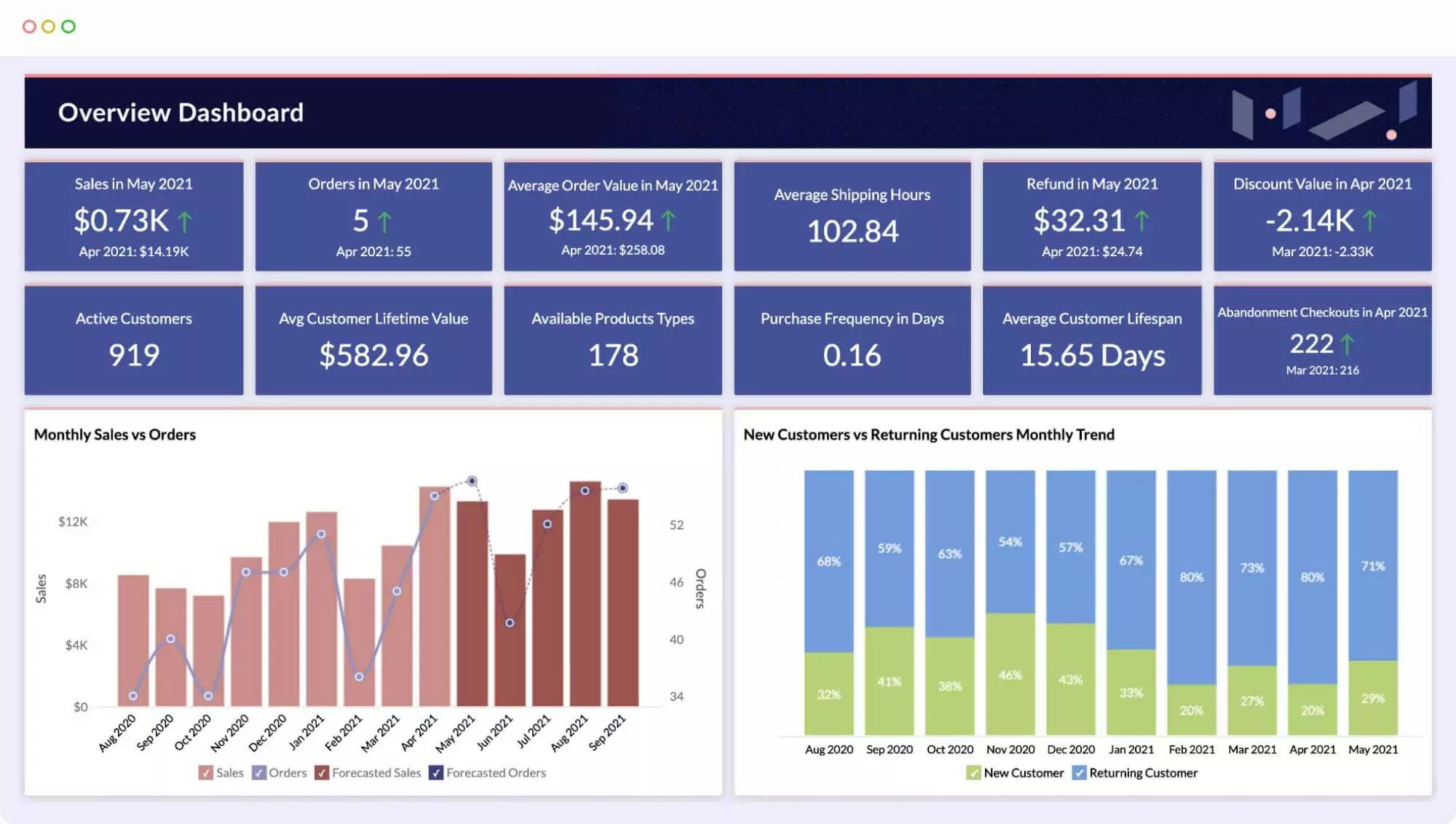
Get Business insights with the on-premise Analytics Plus!
Draw hidden analytics from ServiceDesk Plus Cloud!
Transform huge amounts of raw data into actionable reports and dashboards. Track your key business metrics, see longtime trends, identify outliers, and unearth hidden insights.
- Get and blend data from multiple sources
- Visually analyse your business data
- Augmented analytics
- Collaborate securely online
- Embedded analytics for seamless integration
- Analytics on the move with mobile apps
- 500+ out-of-the-box integrations for your business apps
Need more information?
Review application capabilities instantaneously via online demo links, test out features with free trial licenses or simply browse a range of related product resources.
Need more information?
Review application capabilities instantaneously via online demo links, test out features with free trial licenses or simply browse a range of related product resources.
Zoho Assist
Remote Support Software
Secure cloud-based remote support and remote access software
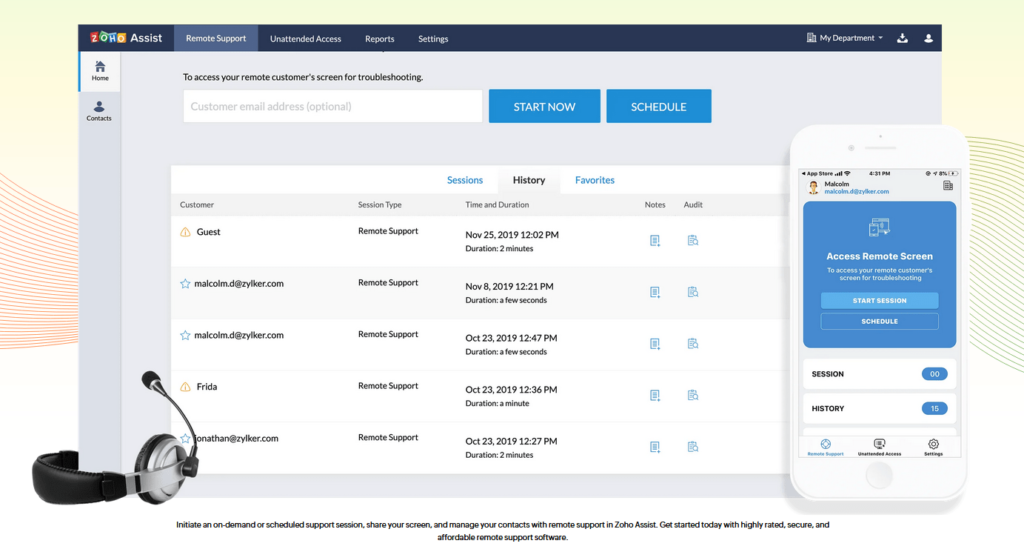
Integrate with ServiceDesk Plus Cloud!
- On-demand remote support sessions both inside and outside LAN.
- Transfer files, reboot and reconnect (both normal and safe mode) and UAC compatible.
- Firewall-friendly, data transmission secured with SSL and 128-bit AES protocol.
- No prior installation is required to start a remote session. Supports multiple monitors.
Need more information?
Review application capabilities instantaneously via online demo links, test out features with free trial licenses or simply browse a range of related product resources.
Need more information?
Review application capabilities instantaneously via online demo links, test out features with free trial licenses or simply browse a range of related product resources.
CloudDNS
An all-in-one DNS management service to keep your business online
Overview
ManageEngine CloudDNS is a robust, cloud-based DNS service designed to provide fast, secure, and reliable domain name resolution for businesses of all sizes. Leveraging a global Anycast network with points of presence at 16 strategic locations, CloudDNS ensures low-latency query resolution (under 20 milliseconds) and can handle over 50,000 queries per second, all while maintaining 100% uptime and DDoS protection. Key features include advanced DNS record management (supporting A, AAAA, CNAME, ALIAS, ANAME, MX, TXT, and more), GeoDNS for location-based traffic routing, DNSSEC for enhanced security, and load balancing with failover capabilities to ensure high availability. The platform also offers detailed domain query analytics, RESTful API access for automation, and comprehensive monitoring with health checks and alerting. With flexible pricing plans and a free trial, ManageEngine CloudDNS is suitable for startups, SMBs, and enterprises seeking a scalable and secure DNS solution.
Key Features
• Points of presence (PoP’s) at global vantage points
• DNS failover protection by automatically routing queries to the closest PoP
• Robust DNS network infrastructure
• Multiple redundant servers ensuring high availability and performance
• Query resolution averaging 30ms from anywhere around the globe
• DNSSEC to shield the integrity of DNS responses
• Integrated monitoring, a secondary DNS, and effective failover strategies
Which IT Challenges Does CloudDNS Solve?
ManageEngine CloudDNS addresses key challenges in DNS management:
• DNS outages: Monitors DNS records in real-time to ensure high availability.
• Security risks: Detects DNS hijacking attempts with automated alerts.
• Manual configuration: Automates DNS record updates, reducing errors and effort.
• Lack of visibility: Provides dashboards to track DNS performance and query metrics.
• Scalability issues: Supports high-volume DNS queries with cloud-based infrastructure.
Which Edition Of CloudDNS Do I Need?
A 30-day free trial is available, allowing organisations to evaluate the features before making a commitment.
Available Platforms
Cloud
Customers Who Bought CloudDNS Also Bought
OpManager – Network, server, and storage performance monitoring